omega0684
|
| posted on 13/4/09 at 09:25 PM |

|
|
Pinto Cam Follower Removal
Evening chaps,
was in the garage today continuing on the my pinto rebuild, ive now finished most of the bottom end recon (see my pinto recon thread for pictures etc)
so i started to work on the head. after reading through the haynes manual it says when removing the cam to remove the cam follower spings first (which
ive done) and then it reads
6) Loosen the locknuts and back off the ball-pin adjuster nuts until the cam followers can be removed (see illustration). Note their locations
for use when refitting. It will be necessary to rotate the camshaft during this operation.
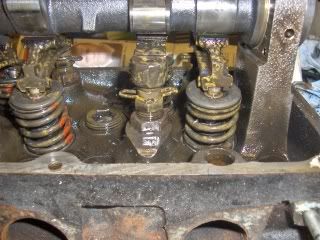
i have tried to replicate the picture in the haynes manual with the photo above, does it mean loosen these nuts in the picture, the top nut under the
spring clip is a 15mm and the lower nut is 19mm, i had a go at trying to undo them but they're so tight i nearly ended up ripping the muscles in
my arms, shoulders and back so i stopped.
if these are indeed the nuts that need to be loosened to allow the removal of the cam follower, do any of you have any ideas on how to loosen the
nuts. tricks of the trade etc.
|
|
|
|
|
tomgregory2000
|
| posted on 13/4/09 at 09:31 PM |
|
|
Get down the gym 
Or put a rather long extension on?
|
|
|
Dingz
|
| posted on 13/4/09 at 09:32 PM |
|
|
The 19mm one is to lock it in place, undo that first
|
|
|
richard
|
| posted on 13/4/09 at 09:55 PM |
|
|
The 15mm is actually part of the post the screw thread is on, so hold it still and then as said above give the 19 mm a turn anti clock wise from
above.
The width of the spanner jaws normally mean you cannot get much of a throw, so just hold the 15 mm still and repossition the 19 to wind the nut up so
the post can then be lowered into the head to allow the follower to come off.
|
|
|
jollygreengiant
|
| posted on 13/4/09 at 10:16 PM |
|
|
Idiots guide to pinto finger removal. -
Remove finger retaining spring.
Pick up small - medium taping hammer.
At ball stud end of finger, give finger a firm but gentle persuasive tap (along length of finger from ball end to valve end, preferably with cam lobe
pointing away from valve. But this last bit is not that important as if valve is partially open the tap needs to be a bit more persuasive) and finger
will pop off ball stud.
Repeat process for all follower fingers.
Undo ball stud(s) lock nut(s) at leisure.
Beware of the Goldfish in the tulip mines. The ONLY defence against them is smoking peanut butter sandwiches.
|
|
|
flak monkey
|
| posted on 14/4/09 at 06:45 AM |
|
|
You just need a longer spanner. Quite why people do them up so tight is beyond me, they dont need to be cranked up so tight in the first place.
Just put a 19mm spanner on the lock nut and give it a clout with a large hammer if they are being stubborn.
David
Sera
http://www.motosera.com
|
|
|
gregs
|
| posted on 14/4/09 at 07:36 AM |
|
|
quote:
Originally posted by flak monkey
Just put a 19mm spanner on the lock nut and give it a clout with a large hammer if they are being stubborn.
David
Like he said!
|
|
|







.jpg)